
JML Process Explained: Definition, Benefits, Best Practices
JML Process Explained: Definition, Benefits, Best Practices
The JML process, short for joiners, movers, and leavers, is one of the most important workflows for IT teams.
Every time a new employee joins, changes roles, or leaves your company, you should control access rights to systems, data, and tools.
If this process is weak, you risk data breaches, compliance failures, and wasted IT time. On the other hand, a strong JML process improves security, saves time, and provides a smoother employee experience.
This article explains the JML process in detail. We’ll also cover the benefits and best practices you can implement to manage the employee lifecycle efficiently.
What Are Joiners, Movers, and Leavers?
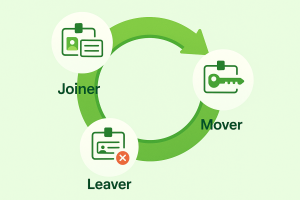
The JML process is the structured way IT teams handle user access during the entire identity lifecycle. It is built around three groups:
- Joiners: New employees who need user accounts, devices, and access to company systems from day one.
- Movers: Existing employees who change roles, departments, or responsibilities and need their access permissions updated.
- Leavers: Those who exit the company should have all employee access immediately revoked to protect sensitive data.
This process provides a clear framework to manage user identities, control access privileges, and reduce risks.
Key Stages of the JML Process
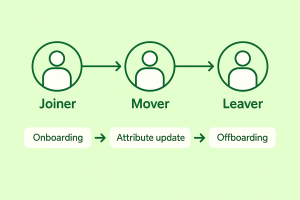
Let’s take a closer look at the three main stages of the JML process:
Joiner Process
The joiner stage is when new users join your company. It’s also known as the employee onboarding phase.
During this stage, IT teams need to create accounts, set up mailboxes, assign the right access, and prepare devices. Permission rights should match the employee’s role, so they have the access needed to perform their tasks on day one.
The joiner stage sets the tone for an employee’s first impression. Having a smooth process accelerates time-to-productivity and improves trust in IT support.
Mover Process
As employees get promoted or take on new responsibilities within your organization, the mover or transfer stage becomes important.
If their access is not updated, they could face delays or end up with more than they need.
You should update permissions, remove old ones, and add only what is relevant to the new role to avoid privilege creep. The goal is to balance productivity with security.
Leaver Process
The final phase of the JML process is the leaver stage, also known as employee offboarding.
When someone departs your company for any reason, IT teams should act quickly to disable accounts, revoke permissions, recover devices, and dispose of assets (if needed).
Leaving this step incomplete creates lingering access, which puts systems and company data at risk. Former employees with active accounts are one of the biggest insider threats.
You should follow a strict IT offboarding checklist, which covers email, cloud platforms, and third-party apps.
Benefits of an Effective JML Process
A strong JML process is important for several reasons. Below are the advantages of managing joiners, movers, and leavers effectively.
Strengthen Security
A well-planned JML process reduces security risks by controlling access at every stage of the employee lifecycle.
It makes sure only appropriate access is granted to employees based on their job titles, roles, and responsibilities. This protects your most critical systems against potential threats, security breaches, and misuse.
During offboarding, permissions are automatically revoked to prevent ex-employees from accessing sensitive information.
IT teams benefit from knowing that permissions are properly managed throughout the entire lifecycle, so data and systems stay safe.
Maintain Compliance
A strong JML process helps you avoid compliance violations by keeping access aligned with data protection regulations.
It documents each stage to create a reliable audit trail. This documentation proves that you meet regulatory compliance.
You can also face external checks with more confidence. Plus, you avoid potential financial and reputational damage that comes from non-compliance.
Improve the Employee Onboarding Experience
When the joiner or onboarding stage is managed properly, new hires gain the correct permissions to applications, email, and critical systems right away. They no longer need to request access.
This means less downtime, fewer onboarding tickets, and less frustration for both the employee and IT staff.
A smooth onboarding process also reflects well on IT leaders, showing that the department is organized and reliable from the start. Over time, this increases user satisfaction and prevents early employee turnover.
Simplify Identity and Access Management
Identity and access management becomes much easier when you handle the JML process efficiently.
You avoid role creep and mitigate shadow IT by establishing clear roles and responsibilities from the start.
You also gain real-time visibility into who has access to critical systems. If there’s been a human error in identity lifecycle management, you can quickly identify and correct it.
Boost IT Efficiency
A structured JML workflow directly improves operational efficiency. Since it cuts down on manual processes, your team can focus on higher-value IT projects.
Automated workflows help you respond faster to access requests, whether for movers, leavers, or joiners. This reduces the risk of delays that affect both productivity and data privacy.
IT leaders also benefit from consistency across departments, knowing that every step is handled in the same way.
Best Practices for Implementing the JML Process
To maximize the benefits listed above, you need to strengthen the JML process. Here are the best practices you can implement:
1. Automate User Provisioning and De-Provisioning
When you rely on IT teams to manually create and close accounts, delays and human errors are common. Automation reduces business risk by eliminating manual steps that often lead to mistakes.
Automated provisioning makes sure new accounts are created instantly with the appropriate access rights. New hires can start their jobs without delays.
Meanwhile, instant de-provisioning guarantees that leavers lose access as soon as they exit your company. This closes security gaps and protects sensitive systems from misuse.
2. Follow Onboarding and Offboarding Checklists
IT often forgets to close an email account or remove access from shared drives, which leaves gaps that attackers can exploit.
Detailed checklists help IT teams consistently handle joiners, movers, and leavers without overlooking an important step.
Onboarding checklists should include setting up devices, configuring collaboration tools, and granting access to systems based on job roles.
On the other hand, offboarding checklists should focus on disabling logins, revoking access, reclaiming hardware, and retiring IT assets.
Standardizing these steps makes sure every employee’s lifecycle is handled the same way. It keeps processes predictable and easier to audit when needed.
3. Integrate HR and IT Systems
Connecting your HR systems to IT management software is among the most effective ways to strengthen the JML process.
Hiring managers are always the first to know when someone joins, moves, or leaves your company. If this information doesn’t reach IT teams in real time, access delays and oversights occur.
By integrating HR and IT platforms, identity changes automatically sync with account provisioning workflows. That means new joiners get access faster, movers receive correct permissions without delay, and leavers lose access as soon as they exit.
4. Use Role-Based Access Control (RBAC)
RBAC tools give IT managers a structured way to assign permissions based on roles, not individuals.
Instead of manually selecting systems for each employee, you tie access to job functions. This simplifies access management and reduces human errors.
For example, if you add an employee to the “Finance” group, they automatically gain access to the finance applications and folders. If they change roles, IT only updates the group and not dozens of permissions to maintain security.
RBAC is especially powerful when linked with Active Directory accounts, since groups and permissions can flow across connected systems.
5. Enforce the Principle of Least Privilege
The principle of least privilege means employees should only have access to what they need, and nothing more. This reduces the chance of insider misuse and lowers your attack surface.
IT managers should review every role and define the minimum set of permissions required. Then, use automation and attribute-based access control (ABAC) to apply those limits consistently.
Least privilege also helps you meet regulatory requirements, since most security frameworks demand strict control over digital identities and permissions.
You can even minimize the risk of privilege creep, where employees gradually collect permissions as they move through roles. By limiting access, IT protects sensitive data while still giving staff the tools to do their jobs.
6. Conduct Regular Access Audits
Even with automated workflows, you need ongoing access reviews. Over time, employees may collect permissions that no longer match their job.
Schedule quarterly or bi-annual reviews to compare access rights with job responsibilities.
During these audits, remove unnecessary rights, confirm privileged accounts are justified, and double-check temporary access for contractors and interns. This keeps the JML process tight, consistent, and secure.
7. Log All JML Activities
Monitoring gives IT teams real-time visibility into all account changes across joiners, movers, and leavers. This includes provisioning, role changes, and account closures.
By logging each event, you can track anomalies and respond quickly to unusual activity. For example, if a leaver’s account remains active past their exit date, you can fix the issue before it creates security gaps.
Don’t forget to cover collaboration tools, since many employees use external apps outside core systems. Set alerts and generate reports to record all identity lifecycle events.
This transparency improves audit readiness, since you can show a full log of access changes.
8. Track Key Metrics and Improve the JML Process
IT managers should track metrics such as average onboarding time, time to remove access for leavers, and the number of provisioning errors. These numbers highlight where adjustments are needed.
For example, if onboarding is too slow, you may need better automation, tighter HR integration, or advanced IAM solutions. However, when offboarding lags, your process may lack proper coordination.
Linking metrics to business needs ensures IT delivers real value. It also shows executives how IT contributes to both security and efficiency.
Over time, these insights allow you to refine processes, reduce risk, and maintain strong governance.
Automate the JML Process With ezOnboard
ezOnboard by CloudView Partners automates onboarding, role changes, and offboarding in one platform. You never have to manage joiners, movers, and leavers manually anymore.
It works by connecting your HR systems to on-premises Active Directory or cloud-based Entra ID. Once integrated, the platform lets you define your access rules once with simple plug-and-play formulas.

New hires get access to the right apps and systems as soon as they start. When people move roles, ezOnboard automatically updates permissions without delays. Once employees leave, the platform instantly removes user access and reclaims software licenses.
ezOnboard helps you reduce security risks, maintain regulatory compliance, and save valuable time by automating JML processes.
Request a demo today or check this ROI calculator to see your cost savings.
FAQs About the JML Process
What is the JML process in IAM?
The JML process in identity and access management (IAM) controls user access across systems. It involves onboarding, role changes, and offboarding. IT teams use it to grant, update, and remove permissions.
The goal is to keep accounts accurate, reduce risks, and support compliance throughout the employee lifecycle.
What is the JML process in HR?
In HR, the JML process connects lifecycle events with IT actions. When employees join, move roles, or leave, hiring managers instantly update records. These changes trigger IT teams to adjust accounts and permissions.
What does JML stand for?
JML is short for joiners, movers, and leavers. These three stages define the lifecycle of every employee in a company.
What is the JML lifecycle?
The JML lifecycle describes the full path of an employee’s access, from hiring to exit. It starts when a new hire joins and receives accounts.
It continues as they change roles and need permission updates. It ends when they leave, and IT immediately revokes access to protect company data.

See Your Cost Savings With EzOnboard
See how much you can save on IT onboarding and offboarding with ezOnboard
Call
(732) 755-0805
info@cloudviewpartners.com
ezonboard@sanjaym.sg-host.com